Selection
CheckBox and RadioButton
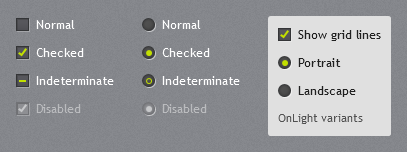
A dark 12px box (or circle) with a 1px dark border, an inner shadow and a faint outer highlight. The check mark and the radio dot use the accent highlight colour (bright lime for green). Hover adds an accent ring inside the box. IsThreeState shows a short bar (check box) or a ring (radio button) for the indeterminate state.
<CheckBox Content="Keep Active" IsChecked="True" />
<CheckBox Content="Partly selected" IsThreeState="True" IsChecked="{x:Null}" />
<RadioButton Content="Weekly" GroupName="Interval" IsChecked="True" />
The label is white for use on the texture or dark panels. On light surfaces (menus, dialogs, tool bars) use the dark-text variants:
<CheckBox Style="{StaticResource JetPack.Styles.CheckBox.OnLight}" Content="Show grid lines" />
<RadioButton Style="{StaticResource JetPack.Styles.RadioButton.OnLight}" Content="Landscape" />
Check boxes and radio buttons inside a ToolBar use the dark text automatically.
ToggleSwitch
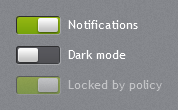
jp:ToggleSwitch is a ToggleButton drawn as a dark recessed track with a light sliding knob; the track fills with the accent selection gradient when on. Content is the label to the right.
<jp:ToggleSwitch Content="Notifications" IsChecked="{Binding NotificationsOn}" />
Use IsChecked, Checked and Unchecked as on any toggle button.
Slider
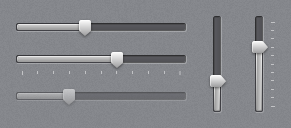
The track is a dark recessed bar; the part below the value is a light grey bar, and the thumb is the pointed light thumb of the original theme. Horizontal and vertical are both supported, with tick marks on either side.
<Slider Maximum="10" Value="4" />
<Slider Maximum="10" TickPlacement="BottomRight" TickFrequency="1" IsSnapToTickEnabled="True" />
<Slider Orientation="Vertical" Height="96" Maximum="10" Value="3" />
IsMoveToPointEnabled is on: clicking the track moves the thumb there.
RangeSlider
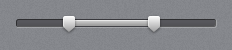
jp:RangeSlider selects a range with two thumbs. Drag a thumb, or focus it and use the arrow keys.
<jp:RangeSlider Minimum="0" Maximum="10000" LowerValue="{Binding MinPrice}" UpperValue="{Binding MaxPrice}" SmallChange="100" />
| Property | Type | Default | Description |
|---|---|---|---|
Minimum, Maximum | double | 0, 100 | |
LowerValue, UpperValue | double | 25, 75 | Two-way bindable; the lower value never passes the upper. |
SmallChange | double | 1 | Arrow-key step. |
Rating

jp:Rating shows a row of stars: filled stars use the accent highlight, empty ones the dark track colour. Hovering previews a value; clicking the current value again clears it.
<jp:Rating Value="{Binding Score}" Maximum="5" />
| Property | Type | Default |
|---|---|---|
Value | int | 0 |
Maximum | int | 5 |
IsReadOnly | bool | false |
Arrow keys change the value when the control has focus.