Typography
Fonts
The theme uses Trebuchet MS, which ships with Windows, with Segoe UI as the fallback.
| Key | Value | Used for |
|---|---|---|
JetPack.Fonts.Family | Trebuchet MS, Segoe UI | all controls |
JetPack.Fonts.Family.Heading | Trebuchet MS, Segoe UI | heading styles |
JetPack.Fonts.Family.Mono | Consolas, Cascadia Mono, Courier New | code, keys |
JetPack.Font.Size.Control | 12 | controls (ThemeManager.ControlFontSize) |
JetPack.Font.Size.Small | 11 | tooltips, status bar, captions |
JetPack.Font.Size.Default | 12.5 | window default |
JetPack.Font.Size.Content | 13 | body text |
JetPack.Font.Size.Navigation | 15 | navigation and strip tab headers |
To use another typeface, redefine the two font family keys after merging JetPack.xaml.
Text styles
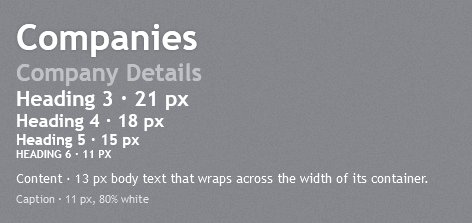
Use these keyed TextBlock styles for text on the textured background:
| Style | Size | Notes |
|---|---|---|
JetPack.Styles.TextBlock.Heading1 | 36, bold | soft glow, as the page titles in the original |
JetPack.Styles.TextBlock.Heading2 | 24, bold | 50% white, for section titles (“Company Details”) |
JetPack.Styles.TextBlock.Heading3 | 21, bold | |
JetPack.Styles.TextBlock.Heading4 | 18, bold | |
JetPack.Styles.TextBlock.Heading5 | 15, bold | column and group titles |
JetPack.Styles.TextBlock.Heading6 | 11, bold | |
JetPack.Styles.TextBlock.Content | 13 | white body text, wraps |
JetPack.Styles.TextBlock.Caption | 11 | 80% white, wraps |
<TextBlock Style="{StaticResource JetPack.Styles.TextBlock.Heading1}" Text="Companies" />
<TextBlock Style="{StaticResource JetPack.Styles.TextBlock.Heading2}" Text="Company Details" />
Label is styled implicitly (white, control font size) and supports access keys (Content="_Name" with Target).
Text rendering
JetPackWindow uses TextOptions.TextFormattingMode="Display", which keeps small text sharp. Large text looks jagged in that mode, so the heading styles and the tab headers switch to Ideal. Do the same for your own large text:
<TextBlock FontSize="38" Text="Jetpack" TextOptions.TextFormattingMode="Ideal" />
Effects such as the heading glow turn ClearType off for that element. The theme uses them only on large text and on the embossed text of light surfaces.