Progress and status
ProgressBar
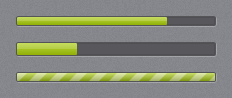
A dark recessed track with the accent gradient as the fill and a glassy top half. When indeterminate, light diagonal stripes move across the fill.
<ProgressBar Value="75" />
<ProgressBar IsIndeterminate="True" />
<ProgressBar Orientation="Vertical" Height="120" Value="40" />
Default height is 10 (width 10 when vertical); set Height for a thicker bar. Maximum defaults to 100.
ProgressRing

jp:ProgressRing is an accent arc spinning over a dark recessed ring, 34×34 by default (it scales with Width/Height).
<jp:ProgressRing IsActive="{Binding IsLoading}" />
| Property | Type | Default | Description |
|---|---|---|---|
IsActive | bool | true | When false the ring is hidden but keeps its space. |
BusyIndicator
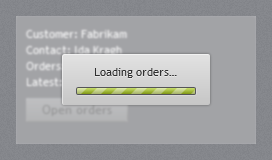
jp:BusyIndicator wraps content. While IsBusy is true it blurs and dims the content, disables it so it takes no input, and shows a small light card with BusyContent and an indeterminate progress bar.
<jp:BusyIndicator IsBusy="{Binding IsLoading}" BusyContent="Loading orders…">
    <Grid>...</Grid>
</jp:BusyIndicator>
| Property | Type | Default | Description |
|---|---|---|---|
IsBusy | bool | false | |
BusyContent | object | Please wait… | Text or any element shown on the card. |
BlurRadius | double | 3 | Blur applied to the content while busy; 0 turns it off. |
The blur is only applied while busy, so the content keeps ClearType text the rest of the time.
InfoBar
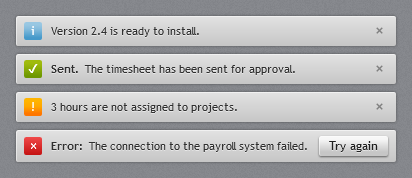
jp:InfoBar is an inline message strip: a light bar with a coloured severity icon, an optional bold title, the message, optional action content and a close button.
<jp:InfoBar Severity="Success" Title="Sent." Message="The timesheet has been sent for approval." />
<jp:InfoBar Severity="Error" Title="Error:" Message="The connection to the payroll system failed." IsClosable="False">
    <Button Content="Try again" Click="OnRetry" />
</jp:InfoBar>
| Property | Type | Default | Description |
|---|---|---|---|
Severity | InfoBarSeverity | Info | Info (blue i), Success (green ✓), Warning (orange !), Error (red ×). |
Title | string? | null | Bold text before the message; hidden when null. |
Message | string? | null | |
IsOpen | bool | true | Two-way bindable; the bar collapses when false. |
IsClosable | bool | true | Shows the × button. |
Content | object | Action area at the right, e.g. a button. |
Event: Closed, raised when the user clicks ×.