Progress and status
ProgressBar
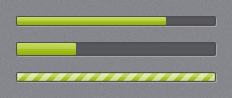
jp-progress-bar is a <progress class="jp-progress-bar">: the dark track with the accent fill, or the running accent stripes when it is indeterminate. It is as wide as its container and 10 px high; set the size with your own classes, as the gallery’s second bar does with !h-[14px].
<jp-progress-bar value="75" />
<jp-progress-bar value="3" maximum="8" />
<jp-progress-bar is-indeterminate="true" />
<progress class="jp-progress-bar" max="100" value="75"></progress>
<progress class="jp-progress-bar" max="8" value="3"></progress>
<progress class="jp-progress-bar" max="100"></progress>
| Attribute | Default | Description |
|---|---|---|
value | 0 | the progress |
maximum | 100 | the value of a full bar |
is-indeterminate | false | the running stripes (a <progress> without value) |
From script, set value on the element; remove the attribute (removeAttribute('value')) to make it indeterminate.
ProgressRing

jp-progress-ring is the spinning accent arc on a dark ring, 34 px by default. The ring keeps its proportions at any size.
<jp-progress-ring />
<jp-progress-ring class="!size-6" />
<jp-progress-ring is-active="false" />
<span class="jp-progress-ring" role="progressbar" aria-label="Working" data-active="true"></span>
| Attribute | Default | Description |
|---|---|---|
is-active | true | false hides the ring but keeps its space (data-active="false") |
BusyIndicator
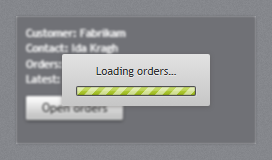
jp-busy-indicator blurs and dims its content and shows a light card with a message and a running progress bar over it. While it is busy, the content cannot be clicked.
<jp-busy-indicator id="Orders" is-busy="true" busy-content="Loading orders…">
    …the content…
</jp-busy-indicator>
<div class="jp-busy-indicator" id="Orders" data-busy="true" aria-busy="true">
    <div class="jp-busy-indicator__content">…the content…</div>
    <div class="jp-busy-indicator__card" role="status">Loading orders…<progress class="jp-progress-bar"></progress></div>
</div>
| Attribute | Default | Description |
|---|---|---|
is-busy | false | busy when the page loads |
busy-content | Please wait… | the message on the card |
There is no script behind it; switch it with the two attributes:
const busy = document.getElementById('Orders');
busy.dataset.busy = 'true';  busy.ariaBusy = 'true';
const orders = await fetch('/api/orders').then(r => r.json());
busy.dataset.busy = 'false'; busy.ariaBusy = 'false';
InfoBar
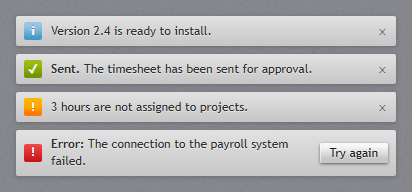
jp-info-bar is a light strip with a coloured severity icon, a bold title and a message. Content inside the tag helper goes to the right as actions, and the × hides the bar.
<jp-info-bar severity="Success" title="Sent." message="The timesheet has been sent for approval." />
<jp-info-bar severity="Error" title="Error:" message="The connection to the payroll system failed." is-closable="false">
    <jp-button>Try again</jp-button>
</jp-info-bar>
<div class="jp-info-bar jp-info-bar--success" role="status">
    <span class="jp-info-bar__icon" aria-hidden="true">✓</span>
    <span><span class="jp-info-bar__title">Sent.</span> The timesheet has been sent for approval.</span>
    <button type="button" class="jp-info-bar__close" data-jp-dismiss aria-label="Close">×</button>
</div>
<div class="jp-info-bar jp-info-bar--error" role="alert">
    <span class="jp-info-bar__icon" aria-hidden="true">!</span>
    <span><span class="jp-info-bar__title">Error:</span> The connection to the payroll system failed.</span>
    <span class="jp-info-bar__actions"><button type="button" class="jp-button">Try again</button></span>
</div>
| Attribute | Default | Description |
|---|---|---|
severity | Info | Info, Success, Warning or Error (InfoBarSeverity) |
title | bold text before the message | |
message | the message | |
is-closable | true | shows the × |
is-open | true | false writes the bar hidden, to show it from script later |
Closing hides the bar (hidden) and raises jp-close on it. data-jp-dismiss on any button in the bar does the same. To show it again, remove hidden.